Migrating To GoToSocial From Mastodon
Learn how to migrate an account from Mastodon to GoToSocial
By Paige Saunders
GoToSocial is a fediverse microblogging service that has been growing in popularity as a Mastodon alternative. One of the best things about it is that it's fully compatible with the "Move" activity which means migrating your followers to and from it works just like it is a Mastodon instance.
Limitations
There are a few limitations to migration and things you should know about a migration first.
Things You Can Migrate
- Followers - Automatically
- Bookmarks - CSV Download/Upload
- Follows - CSV Download/Upload
- Lists - CSV Download/Upload
- Mutes - CSV Download/Upload
- Blocks - CSV Download/Upload
- Domain Blocks - CSV Download/Upload
- Hashtags - Manual Data Entry
Things You Can’t Easily Move
At this point your posts and media cannot easily be migrated. If you are on someone else's mastodon server or one of the large public instances like mastodon.social you cannot migrate your posts.
If this is important to you there is a tool and you are comfortable with command line tools there is a tool called slurp which effectively recreates your posts and media on your new instance.
Portability If you like GoToSocial it is better to move onto an instance and domain that you have some control over sooner rather than later. One advantage of this is a fully portable account
If you are a client of FediHost you can contact our support about recreating media and posts. It is a service we offer.
What You'll Need
- The Login Details For Your Old Mastodon Account
- The Login Details For Your New GoToSocial Account
- Both servers to be communicating with (not blocking) each other
Steps
1. Create New Account
Create a new blank account on your new server. Do not interact or start using the account.
2. Old Mastodon Account: Export Data
On your old account go to download each of the CSV files in Preferences > Import and Export > Data Export
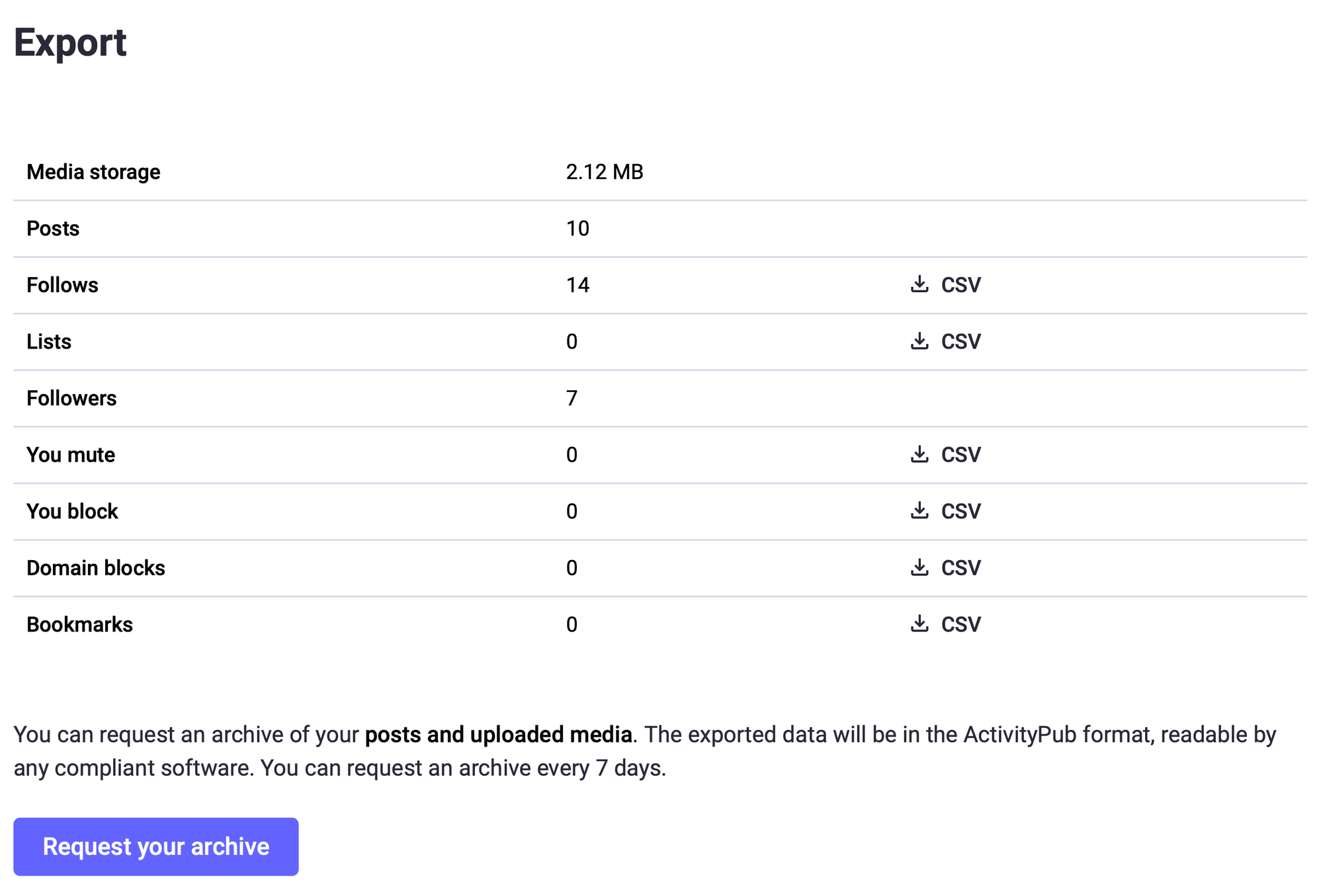
Individually save them with the default names in a folder. You can also request an archive of your posts for your own records or if you are planning to use slurp to migrate posts.
3. New GoToSocial Account: Import Data
On your new account go to Export & Import and upload one by one each of the CSV files that you downloaded from the old server.
The import section of GoToSocial
The CSV files by default have names that closely match the imports. GoToSocial has not fully implemented the user interface for imports at the time of writing for Lists, Mutes and Domain Blocks but they are actively working on implementing these features in the near future.
blocked_accounts.csv -> Blocked Accounts list
following_accounts.csv -> Following list
muted_accounts.csv -> Muting list
4. New GoToSocial: Prepare Alias
On your new account go to Migration
Creating an alias for your old account on a new GoToSocial account
Paste the full URL to the account you are migrating from. You should wait at least 5 minutes before completing the mirrored action of this on your old server. While you wait we can Move Hashtags and Change Display Name as outlined below.
5. Move Hashtags
On your old account go to you profile page and choose the 3 dots beside your profile and select 'followed hashtags' you can also reach this by adding 'followed_tags' to the url of your server.
The location hashtags are stored on an account
Then login to your new GoToSocial account using the Mastodon app. This is necessary because GoToSocial does not have a user interface for this. Add each of the hashtags to your new account by searching and choosing "Follow hashtag".
6. New Account: Set Display Name and Bio
On your new account copy and paste your display name, bio and links from your old account. You can also set your profile and banner image too.
Setting your Display Name and Bio field in GoToSocial
7. New Account: Uncheck Manually Approve New Followers
In your profile account uncheck "Manually approve follow requests" so that you do not have to approve every follower that you are migrating across to this account. You can re-enable this setting after the migration.
8. Old Account: Change Display Name and Bio
On your old account make it extra clear that your account is not active by editing the profile and changing the Display Name to "Your Name (Moved)". Change your bio text to add a link to the new account address.
Changing your Display Name and Bio to make it obvious you have migrated off your old account
9. Old Account: Move Followers
Five minutes should have now passed since you setup the "Account Alias" on your old account. On your old account go to Preferences > Account > Moving To A Different Account
Initiating the action to move followers to your new account
Put your new handle in the box and click continue, this will both redirect the account and migrate your followers. It can take several days for the followers to migrate.
Issues
Missing Followers
When you move accounts you will usually discover that you appear to have lost some followers. This is usually down to the ghost follower phenomenon. When a server leaves the fediverse it doesn't always broadcast this information and so servers that have a tally of users who are following them assume followers are there who may no-longer be. You often only find this out during a move.
Incomplete Move
Another common issue with large accounts is an incomplete move. Sometimes you need to run the follower migration several times. This can be annoying due to the cooldown time between moves.
Why is it so hard to change the Mastodon character limit?
Did you delete your instance and then try to recreate one with the same name?
How to handle issues with the hardest step of setting up managed hosting: DNS.